
Updated 11th August 2026
Not every NBN connection reaches a property in the same way.
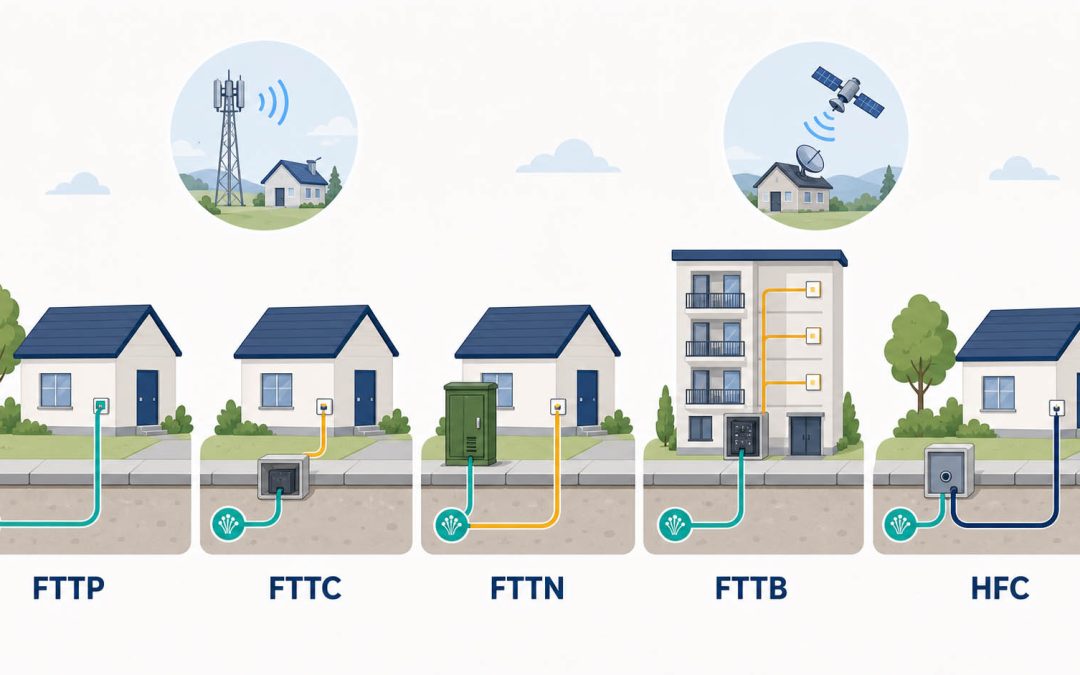
Some premises receive fibre all the way inside, while others use copper telephone wiring, coaxial cable, a fixed wireless antenna or satellite for the final part of the connection. This is known as the NBN Multi Technology Mix.
Your connection type can influence:
- Which speed tiers are available
- The equipment installed at the property
- Where faults are most likely to occur
- Whether old cabling can affect performance
- Which party is responsible for a repair
- Whether the premises may be eligible for a fibre upgrade
Understanding the technology at your address can make it much easier to choose an internet plan and troubleshoot slow speeds or dropouts.
NBN connection types at a glance
| Connection type | Where the fibre reaches | Final connection to the premises | General characteristics |
|---|---|---|---|
| FTTP | The individual premises | Fibre-optic cable | Access to the highest fixed-line speed tiers |
| HFC | A neighbourhood optical node | Coaxial cable | Supports high-speed plans at eligible premises |
| FTTC | A distribution point near the curb | Short copper lead-in | Less copper than FTTN; many premises can upgrade to FTTP |
| FTTN | A neighbourhood node | Existing copper telephone line | Performance can depend on copper length and condition |
| FTTB | A building communications room | Existing copper within the building | Common in apartments and commercial buildings |
| Fixed Wireless | A nearby transmission tower | Radio signal to an outdoor antenna | Used mainly in regional and rural areas |
| Sky Muster satellite | An NBN satellite | Satellite signal to a dish | Used in remote locations |
NBN Co provides an official overview of its different network technologies.
Fibre to the Premises: FTTP
Fibre to the Premises brings fibre-optic cable all the way from the NBN network to the individual home or business.
The installation normally includes:
- An external utility box
- Fibre entering the property
- An internal NBN connection box or network termination device
- An Ethernet connection between the NBN box and the customer’s router
Because the access connection does not rely on copper telephone wiring or coaxial cable, FTTP is generally NBN’s fastest and most reliable residential connection technology.
Eligible FTTP customers can access the full range of current fixed-line wholesale speed tiers through participating providers. These now include wholesale download profiles of up to 2000 Mbps, although the speed achieved by an individual device also depends on the provider, router, Ethernet hardware, Wi-Fi and device capabilities.
Common FTTP considerations
A fast fibre service will not automatically fix poor Wi-Fi. If the connection works well beside the router but performs poorly in another room, the problem is more likely to involve the home network.
Router placement also matters. An NBN connection box installed in a garage, cupboard or corner of the property may not be the best place from which to provide wireless coverage throughout the home.
A customer-side Ethernet cable can be installed from the NBN connection box to a more suitable router location, or the property can use strategically positioned wireless access points.
If the optical or alarm light on the NBN connection box indicates a network fault, contact your internet provider first. Do not open the connection box or interfere with the fibre cable.
Hybrid Fibre Coaxial: HFC
Hybrid Fibre Coaxial uses fibre through part of the NBN network and coaxial cable for the final connection to the premises. In many areas, this cable infrastructure was originally installed for subscription television services.
An HFC installation commonly includes:
- A coaxial wall outlet
- An NBN HFC connection box
- An Ethernet connection from the NBN box to the customer’s router
Eligible HFC premises can access high-speed wholesale plans, including the current 2000 Mbps download profile through participating providers. Upload profiles and other technical characteristics can differ from FTTP.
Common HFC considerations
Performance can be affected by:
- Coaxial signal problems
- Damaged or unsuitable connectors
- NBN network faults
- Provider capacity
- An ageing or unsuitable router
- Poor Wi-Fi coverage
- Slower Ethernet ports or devices
The NBN HFC connection box and NBN-side coaxial network should be investigated through the internet provider. A private technician can assist with customer-side Ethernet cabling, router placement, data outlets and Wi-Fi after a network fault has been excluded.
Fibre to the Curb: FTTC
Fibre to the Curb brings fibre much closer to the property than FTTN.
The fibre normally terminates at a small Distribution Point Unit, or DPU, located in a telecommunications pit near the property boundary. The existing copper lead-in then carries the service from the DPU into the premises.
Inside the property, an NBN FTTC Network Connection Device is plugged into a suitable telephone socket. This device supplies power back through the copper pair to the DPU and presents an Ethernet connection for the router.
The DPU is not normally installed inside the customer’s premises.
Common FTTC considerations
Although the copper section is relatively short, FTTC performance can still be affected by:
- Damaged copper lead-in cabling
- Poor internal cable joints
- Old telephone sockets
- Unused extensions
- Bridge taps
- Water or corrosion
- An unsuitable socket location
If the provider’s testing suggests the fault is inside the property, a registered cabler can inspect the customer-side copper path and sockets.
FTTC to FTTP upgrades
A major change occurred on 1 July 2026. NBN removed the previous requirement for FTTC customers to order a high-speed plan before requesting a full-fibre upgrade.
NBN says customers within the FTTC footprint can now contact their provider about upgrading to FTTP while selecting the speed plan that suits their needs. Conditions, installation requirements and provider arrangements should still be confirmed for the individual address.
You can read the official FTTC upgrade announcement or check the NBN address tool for current eligibility.
Fibre to the Node: FTTN
Fibre to the Node brings fibre to a street cabinet or neighbourhood node. The existing copper telephone network carries the connection from the node to each property.
At the premises, a compatible VDSL modem or modem-router is connected to a telephone socket.
The speed available on an FTTN connection can be affected by:
- Distance from the node
- The length of the copper path
- Cable condition
- Water or corrosion in the network
- Poor joints
- Old internal telephone cabling
- Multiple sockets and unused extensions
- Bridge taps
- Modem compatibility
This explains why two homes on the same retail plan can receive different FTTN line speeds.
What can be improved on FTTN?
A registered cabler may be able to improve the customer-side environment by:
- Testing internal cabling
- Removing unnecessary extensions
- Correcting poor terminations
- Installing a suitable dedicated socket
- Identifying a bridge tap
- Relocating the modem connection point
However, internal repairs cannot shorten the copper network between the premises and the node. If the limiting fault or distance is outside the property, the internet provider must investigate and escalate it to NBN when appropriate.
Many FTTN premises are now eligible for an upgrade to FTTP. Check the address with NBN and ask a participating internet provider about the applicable plan and eligibility conditions.
Fibre to the Building: FTTB
Fibre to the Building is commonly used in apartment blocks, office buildings and other multi-dwelling properties.
Fibre normally reaches a communications room or distribution point within the building. Existing copper pairs then carry the service through the building’s Main Distribution Frame and internal risers to each unit.
The customer generally connects a compatible VDSL modem-router to a telephone socket inside the apartment or office.
Common FTTB considerations
FTTB faults can involve several separate sections:
- The NBN network entering the building
- NBN equipment in the communications room
- The MDF connection
- Building-owned cabling
- The copper pair to the unit
- Internal cabling and sockets inside the unit
- The modem, router or Wi-Fi network
This can make responsibility less obvious than in a standalone house.
A provider should test the service first. If the connection requires work between the building frame and the apartment, a registered technician may be needed for MDF jumpering or permitted building cabling work.
Residents should not access an MDF themselves.
Can an FTTB building upgrade to FTTP?
Some eligible apartment buildings and complexes can apply for a full-fibre upgrade. This normally requires involvement from the building’s body corporate, owners corporation or authorised representative.
Eligibility and costs depend on the building and upgrade program. Individual residents generally cannot arrange a whole-building upgrade without the appropriate building authority.
NBN Fixed Wireless
Fixed Wireless is used primarily in regional and rural areas where individual premises are too dispersed for an economical fixed-line rollout.
An outdoor antenna installed at the property communicates by radio with an NBN transmission tower. The antenna connects to an NBN connection box inside the premises, which then connects to the customer’s router.
Performance can be affected by:
- Signal conditions
- The property’s location relative to the tower
- Network demand
- The NBN plan
- Router and Wi-Fi performance
- The capabilities of connected devices
NBN has been upgrading parts of its Fixed Wireless network, and higher speed options may be available at eligible addresses.
The outdoor antenna and NBN connection equipment should not be adjusted by the customer. Report suspected signal or network faults through the internet provider.
Sky Muster satellite
Sky Muster satellite provides NBN access in remote and isolated areas where fixed-line and Fixed Wireless connections are not practical.
The service uses:
- A satellite dish installed at the property
- NBN-supplied connection equipment
- A customer router
- One of the available satellite plans
Satellite connections cover a very large geographic area but have higher latency than fixed-line services because the signal must travel to and from a satellite.
This can be noticeable during real-time activities such as video calls, online gaming and remote desktop use.
Sky Muster is the NBN satellite service; it should not be treated as a separate connection category from “NBN satellite”.
Dish alignment, satellite equipment and NBN network faults should be handled through the provider and an authorised NBN technician.
How do I find my NBN connection type?
The most reliable method is to use the official NBN address checker or ask your internet provider.
Equipment can also provide clues.
FTTP
You will normally have a wall-mounted NBN fibre connection box inside the premises. The router connects to one of its Ethernet ports.
HFC
You will normally have an NBN HFC connection box connected to a coaxial wall outlet.
FTTC
You will normally have a small NBN Network Connection Device plugged into a telephone socket. The router connects to it using Ethernet.
FTTN or FTTB
You will normally have a VDSL modem or modem-router connected directly to a telephone socket, without a separate NBN connection box inside the unit.
The NBN address result helps distinguish FTTN from FTTB.
Fixed Wireless
The property will normally have an outdoor antenna and an indoor NBN connection box.
Satellite
The property will have an external satellite dish and associated NBN equipment.
Do not rely solely on the appearance of a wall socket. Previous telecommunications services and unused cabling can remain in a property after the connection technology has changed.
Does the NBN connection type determine your speed?
Your connection type affects which wholesale speed tiers are technically available, but it is not the only factor determining performance.
Think of the relationship this way:
- Connection technology establishes the type and potential capability of the access connection.
- The NBN speed tier places a wholesale limit on the service.
- The internet provider supplies the retail service and network capacity.
- Your router and local network deliver the connection to individual devices.
- Wi-Fi conditions and device capabilities affect the final speed experienced by the user.
An FTTP property on a 25 Mbps plan will not automatically receive gigabit speeds. Likewise, buying the fastest available plan will not overcome a slow Ethernet port or poor Wi-Fi coverage.
See our updated guide to choosing the right NBN speed tier for a detailed comparison.
Can you change your NBN connection type?
Customers generally cannot select a different NBN technology simply by changing internet providers. The technology is determined by the network available at the address.
However, several upgrade pathways may apply:
NBN fibre upgrade programs
Eligible FTTN and FTTC properties may be able to upgrade to FTTP through a participating provider. Conditions vary by technology and address.
As of 1 July 2026, NBN no longer requires FTTC customers to select a high-speed plan merely to request the upgrade.
Apartment and building upgrades
Eligible buildings may be able to upgrade through an NBN program involving the body corporate or authorised building representative.
Technology Choice Program
Where a standard upgrade is not available, NBN’s Technology Choice Program may allow a property owner to apply for a paid technology change. Construction costs can be significant and depend on the premises.
Always use the official NBN address checker and speak with the provider before making plans based on an expected upgrade.
Does moving to FTTP fix Wi-Fi problems?
Not necessarily.
FTTP can improve the access connection and provide higher potential speeds, but it does not change the physical environment inside the home.
Wi-Fi may remain poor because of:
- Router placement
- Thick walls or concrete floors
- Interference
- Distance
- An older router
- Poorly positioned mesh units
- Device limitations
Plan the router location and home network before or during the fibre installation. A well-positioned router, Ethernet cabling and properly installed access points can make more practical difference than simply purchasing the highest plan.
Who should fix an NBN fault?
Your internet provider should generally be the first point of contact for:
- Known outages
- Service activation problems
- NBN connection-box alarms
- Optical signal faults
- HFC network or connection-box faults
- Fixed Wireless signal faults
- Satellite equipment faults
- Suspected faults in NBN-owned infrastructure
- Problems affecting the service before it reaches the property boundary
The provider can test the service and lodge a fault with NBN Co when required.
A private registered cabler or technician may be appropriate when:
- The provider says the fault is inside the premises
- FTTN, FTTB or FTTC internal copper cabling needs testing
- A telephone socket is damaged or incorrectly wired
- Unnecessary extensions or bridge taps are affecting the service
- An apartment connection requires an MDF jumper
- The router needs a better location
- Ethernet or data outlets are required
- Wi-Fi coverage needs improvement
- Customer-side cabling is damaged
- The ownership of a possible lead-in cable problem needs to be established
Fixed telecommunications cabling should be handled by an appropriately registered cabler.
Frequently asked questions
Which NBN connection type is best?
FTTP is generally NBN’s fastest and most reliable residential technology and supports the full range of current fixed-line speed tiers. HFC can also support very high download speeds at eligible premises.
The best practical result still depends on the chosen plan, provider and home network.
Is HFC a full-fibre connection?
No. HFC uses fibre through part of the network and coaxial cable for the final connection to the premises. Full fibre to the individual premises is FTTP.
Is FTTC better than FTTN?
FTTC brings fibre closer to the premises and uses a much shorter copper section. This generally reduces the copper distance compared with FTTN.
Individual performance still depends on the condition of the connection and internal cabling.
Does FTTC have an NBN connection box?
Yes. FTTC uses an indoor Network Connection Device connected to a suitable telephone socket. This device powers the external DPU and provides an Ethernet connection for the router.
Can old phone sockets affect NBN performance?
They can affect technologies that use the premises’ copper telephone wiring, particularly FTTN, FTTB and FTTC. Unused extensions, poor joins and bridge taps may contribute to instability or reduced line performance.
They do not carry the FTTP fibre signal, although poor router placement and customer-side networking can still affect an FTTP user’s experience.
What type of NBN connection do apartments use?
Apartments may use FTTB, FTTP, FTTN, FTTC, HFC or a non-NBN fibre network. Check the individual address rather than assuming every unit in Sydney uses FTTB.
Can a private technician upgrade my property from FTTN to FTTP?
The network technology change must be arranged through an internet provider and NBN Co. A private technician cannot independently convert the NBN network to FTTP.
A registered cabler can assist with permitted internal data cabling, router placement and preparing the property’s customer-side network.
Can I move my NBN connection box myself?
No. Do not move, open or modify NBN connection equipment yourself. Speak with the provider about the correct relocation process.
A registered cabler may be able to install related customer-side Ethernet or data cabling once the required equipment position and network boundary have been established.
Need help with your connection inside the premises?
If your provider has ruled out an NBN network fault and the problem appears to involve internal sockets, copper cabling, an MDF connection, Ethernet or Wi-Fi, Telecom Today can investigate the customer-side setup.
Book a private NBN technician in Sydney to identify how your connection reaches the premises and where the fault or performance bottleneck is occurring.