
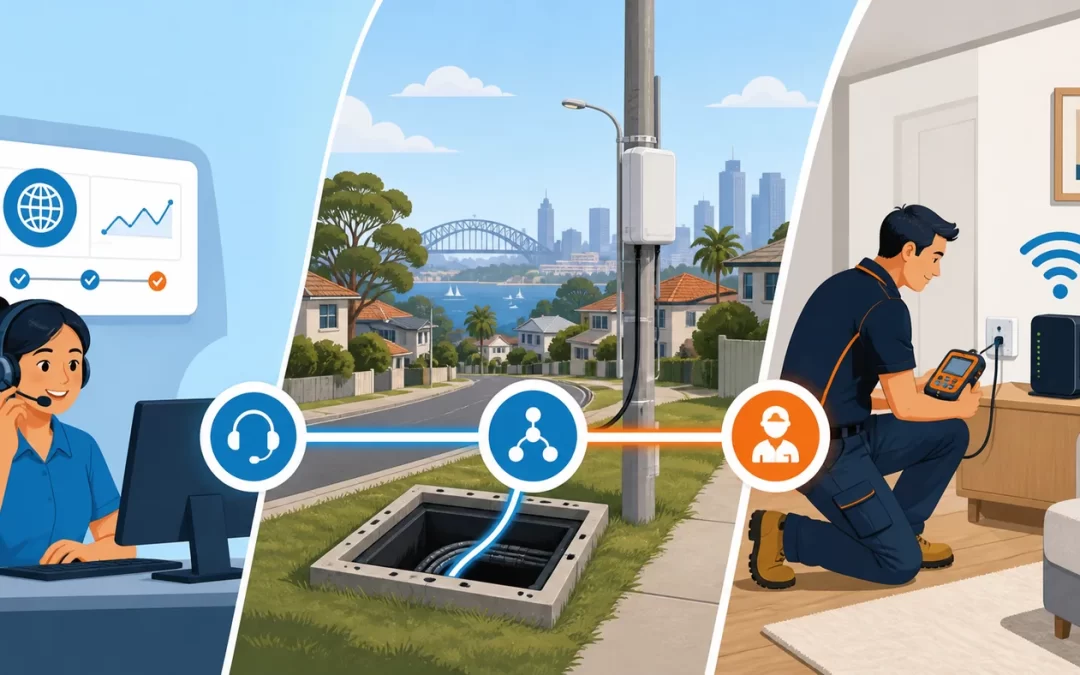
When an NBN connection stops working, knowing who to call can be surprisingly difficult.
Your internet provider may tell you that the line appears active. NBN Co may direct you back to your provider. Meanwhile, the real problem could be a damaged socket, faulty internal cable, poorly positioned router or connection inside an apartment building.
The reason for this confusion is that several organisations can be involved in delivering one internet connection. Each is responsible for a different part of the service.
This guide explains when to contact your internet provider, when NBN Co is involved and when an independent NBN technician or registered cabler may be able to help.
The short answer
For most NBN service problems, your internet provider should be your first contact.
NBN Co operates the wholesale access network, while your provider supplies and manages the retail internet service you use. Your provider can run preliminary tests, check your account and plan, identify known outages and lodge a fault with NBN Co when necessary.
A private technician becomes useful when the fault appears to involve customer-side cabling, sockets, a router, Wi-Fi coverage, data cabling or another part of the network inside the premises.
You may contact NBN Co directly for certain matters involving damage to NBN infrastructure, NBN-supplied equipment installation, contractor conduct or property damage. It is not generally the first contact for an ordinary slow-speed, dropout or no-service complaint.
Why NBN fault responsibility can be confusing
An internet connection is not a single piece of equipment. It is a chain that may include:
- NBN infrastructure in the street
- A lead-in cable or fibre connection to the property
- NBN-supplied equipment
- Your provider’s network and service configuration
- Internal telecommunications cabling
- Phone and data sockets
- A modem or router
- Ethernet cabling
- Wireless access points
- The device being used
A fault anywhere in that chain can produce similar symptoms.
For example, frequent dropouts could be caused by an NBN network fault, unstable customer cabling, a failing router, Wi-Fi interference or a problem affecting only one device. Identifying where the problem begins is therefore an important part of deciding who needs to fix it.
When to contact your internet provider
Your phone or internet provider should normally be the first contact for:
- A complete loss of internet service
- Recurring connection dropouts
- Speeds that are consistently below expectations
- Connection or activation delays
- A missing or incorrect service address
- NBN appointment problems
- Missing NBN equipment
- Questions about your plan, account or billing
- A suspected NBN network outage
NBN Co’s current guidance directs residential and business customers to their provider for service performance concerns, including slow speeds, dropouts and service loss.
Your provider can check whether your service is correctly configured, perform remote diagnostics and determine whether the fault needs to be raised with NBN Co. If NBN-owned infrastructure requires attention, the provider can arrange the appropriate fault process.
What to ask your provider
When reporting a fault, ask the provider to:
- Confirm whether an outage is affecting your address.
- Run a line or service test.
- Check for recent disconnections or instability.
- Confirm whether the service is reaching the NBN network boundary.
- Check whether your router is correctly authenticated and configured.
- Provide a fault or case reference number.
- Explain the next step if the initial test does not identify the problem.
Keep a record of the dates, times and symptoms. Screenshots of speed tests and notes about dropouts can be useful when a problem is intermittent.
When to check for an NBN outage
Before arranging a private technician, check the official NBN network-status page.
An area outage may affect many properties and cannot be repaired from inside your home or office. If an outage is shown, monitor the restoration information and contact your provider if you need further assistance.
If no outage is listed but your connection remains unavailable, contact your provider. An individual service fault will not always appear as a general area outage.
Our guide to what to do during an NBN outage provides a more detailed checklist.
When to contact NBN Co directly
NBN Co is responsible for infrastructure within the NBN network. Its direct contact channels cover matters including:
- Damage to NBN equipment or infrastructure
- Damage to property caused during NBN work
- Concerns about an NBN contractor’s conduct
- Complaints about NBN-supplied equipment installation or workmanship
- Some equipment relocation and removal enquiries
- Land-access, health and safety concerns
An ordinary internet-service fault should still generally be reported to your provider first.
NBN Co does not sell retail internet plans directly to the public. Your provider holds the service and account details needed to manage most connection enquiries and can work with NBN Co where network intervention is required.
When a private NBN technician can help
A private or independent technician is not an NBN Co employee. They work on the customer side of the connection within the scope permitted by their cabling registration and competencies.
A qualified technician may be able to help with:
- Damaged or unreliable internal phone cabling
- Loose, corroded or poorly terminated sockets
- Unwanted branches or old cabling affecting a copper-based connection
- Internal Ethernet and data cabling
- Relocating customer-owned routers and networking equipment
- Testing whether a router or Wi-Fi network is causing the problem
- Poor Wi-Fi coverage and wireless dead zones
- Installing wired wireless access points
- Apartment MDF jumpering and customer-side building cabling
- Separating an internal fault from a provider or NBN network fault
- Producing test information that can assist further fault escalation
If your provider reports that the service is reaching the premises but your devices still cannot obtain a reliable connection, internal cabling or networking becomes a stronger possibility.
A private NBN technician in Sydney can test the physical setup and help establish where the fault is occurring.
What a private technician cannot do
A private technician cannot simply open, modify or repair NBN-owned equipment or network infrastructure.
Work involving an NBN connection box, fibre equipment, street pit, external network cable or other NBN-owned facility must be handled through the appropriate authorised process.
An independent technician can inspect the overall setup, test customer-side infrastructure and explain whether the symptoms point back towards the provider or NBN network. They must remain within the permitted customer-cabling boundary and their registration competencies.
This distinction is important. “Private NBN technician” describes a technician experienced with premises connected to the NBN; it does not mean they are authorised to alter every part of the NBN network.
Understanding the network boundary
The network boundary separates carrier or NBN infrastructure from customer cabling and equipment.
Its exact location depends on the connection technology and type of premises. Relevant points may include:
- A network termination device
- An NBN connection box
- A first telecommunications socket
- A main distribution frame in an apartment or commercial building
- Another designated network termination point
The boundary is not identical for every FTTP, FTTN, FTTC, HFC, fixed-wireless or apartment connection.
A registered cabler should identify the applicable boundary and equipment ownership before performing work. This avoids unauthorised alterations and helps ensure that the correct party handles the fault.
Who should you call for different NBN problems?
| Problem | Best first contact |
|---|---|
| A known area outage | Your provider; monitor the NBN status page |
| No internet on every device | Your provider |
| Persistent dropouts on both Ethernet and Wi-Fi | Your provider, followed by testing if the cause remains unclear |
| Slow speeds over a wired Ethernet test | Your provider |
| Good wired speed but poor Wi-Fi | Router support or a private network technician |
| Damaged internal phone socket | Registered cabler or private technician |
| Faulty internal Ethernet cabling | Registered data cabler |
| Weak Wi-Fi in part of the property | Private network technician |
| Damage to an NBN street pit or NBN equipment | NBN’s official reporting channel or your provider |
| Billing or plan problem | Your provider |
| NBN technician appointment problem | Your provider |
| Suspected apartment MDF or internal-pair fault | Provider and a suitably registered cabler, depending on the test result |
| NBN-owned equipment needs relocating | Your provider or NBN’s approved relocation process |
What about NBN faults in apartments?
Apartment connections can be more complicated because the signal may pass through shared building infrastructure before reaching the unit.
Depending on the building and technology, the connection may involve:
- An MDF or communications room
- Building riser cabling
- A jumper connecting the service to the unit
- Internal cabling between the building boundary and apartment
- Strata-controlled common property
- Cabling inside the individual apartment
Your provider should still be the first contact for a service fault. If testing suggests that the service reaches the building but not the apartment, a registered cabler may need to inspect the customer-side path or complete appropriate MDF jumpering.
Permission from the building manager, owner or strata representative may be required before accessing communications rooms or common property.
A sensible NBN troubleshooting sequence
Following the right order can prevent unnecessary appointments and charges.
1. Check whether every device is affected
If only one phone, computer or television has a problem, the NBN connection itself may be working normally.
Test another device before reporting a whole-service fault.
2. Compare Wi-Fi with Ethernet
Where practical, test a computer using an Ethernet connection to the router.
If Ethernet performs well but Wi-Fi does not, the issue is more likely to involve wireless coverage, interference or router placement. A faster NBN plan will not correct poor Wi-Fi coverage.
Telecom Today can assist with wireless access points and Wi-Fi coverage where the incoming internet service is healthy but the wireless network is not.
3. Check cables and indicator lights
Look for disconnected power leads, loose Ethernet cables and visibly damaged cords. Record the lights displayed on the NBN equipment and router.
Avoid opening fixed sockets or NBN equipment. Do not factory-reset the router unless your provider instructs you to do so and you have the settings needed to reconnect it.
4. Check the outage page
Use the official NBN status checker and your provider’s service-status page.
5. Contact your provider
Ask for remote testing and obtain a reference number. Complete reasonable troubleshooting requested by the provider.
6. Arrange customer-side testing if needed
If the provider cannot find a network or account problem, or the symptoms strongly suggest internal cabling, arrange an inspection by a registered technician.
Our guide to common NBN connection issues can help you record useful symptoms before the appointment.
7. Escalate an unresolved provider complaint
If the fault remains unresolved, make a formal complaint to your provider and retain its complaint reference.
Residential customers and eligible small businesses may contact the Telecommunications Industry Ombudsman if they have first given the provider an opportunity to resolve the complaint and remain dissatisfied.
Can an independent test help with a provider fault?
An independent test does not transfer responsibility for NBN infrastructure to a private technician. However, it can provide useful evidence.
A technician may document that:
- The router and local network are functioning correctly
- The internal cabling passes or fails testing
- The fault remains present at a particular termination point
- The problem affects both wired and wireless devices
- A socket or internal cable is visibly damaged
- The symptoms occur before or after customer networking equipment
This can narrow the fault domain and make subsequent discussions with the provider more productive.
The provider and NBN Co will still follow their own diagnostic and repair processes, but clear information can reduce repeated basic troubleshooting.
Does NBN cabling require a registered cabler?
In Australia, regulated fixed and concealed telecommunications cabling must be performed by a registered cabler or someone working under the required direct supervision.
The current ACMA Cabling Provider Rules require appropriate registration and competencies for the work being performed. The work must comply with the applicable Wiring Rules.
Registered cablers are also required to provide a written certification statement after completing customer-cabling work. This may be a TCA1 form or an equivalent compliant statement containing the required information.
Plugging an ordinary Ethernet patch cable into an accessible port is different from installing cable through a wall, ceiling or building cavity. Fixed cabling work should be left to a properly registered professional.
Who normally pays for the repair?
The answer depends on where the fault is found and what caused it.
A customer will commonly pay for:
- Repairing customer-owned internal cabling
- Replacing damaged customer sockets
- Improving Wi-Fi coverage
- Replacing a customer-owned router
- Installing new data points
- Optional equipment or cabling relocation
- Correcting privately installed non-compliant cabling
Provider or NBN processes may apply when the problem is within the retail service or NBN-owned infrastructure.
Do not assume responsibility before testing has located the fault. Ask your provider and technician to explain what has been tested, where the problem appears to be and what work is proposed.
Frequently asked questions
Can I contact NBN Co directly about slow internet?
For ordinary slow-speed, dropout or service-loss problems, contact your internet provider first. The provider supplies your retail service and can raise a network fault with NBN Co where required.
Can a private technician repair an NBN connection box?
A private technician should not alter or repair NBN-owned equipment without the appropriate authority. They can test customer-side cabling and equipment and help determine whether the symptoms point towards the NBN network.
Can an electrician repair NBN or data cabling?
Only if the electrician also holds the appropriate cabling registration and competencies, or the work is performed under the supervision required by the ACMA rules. An electrical licence by itself is not necessarily a telecommunications cabling registration.
Who fixes the router?
If the router was supplied by your provider, contact the provider first. If it is customer-owned, support may come from the manufacturer or a private network technician.
Who fixes Wi-Fi dead zones?
Wi-Fi coverage within the property is generally a customer-side network issue. A private technician can assess router placement, interference, building construction, Ethernet cabling and wireless access-point options.
Can a private technician force my provider to lodge an NBN fault?
No. A technician can provide test results and help identify where a fault appears to sit, but the provider controls its support and escalation process.
Should I call a private technician during a confirmed outage?
Usually not. A private appointment cannot repair a known area-wide NBN outage. Wait for the outage to be resolved unless you also have a separate internal-cabling or network problem.
Need help locating an NBN fault?
Telecom Today provides independent NBN troubleshooting, registered customer cabling, socket repairs, data cabling, Wi-Fi improvements and apartment MDF services throughout Sydney.
We are an independent telecommunications contractor, not NBN Co or your internet provider. Our role is to test and repair authorised customer-side infrastructure and help identify when a fault needs to be returned to the provider.
If your provider says the service is active but your connection remains slow, unstable or unavailable, call Telecom Today on 0450 44 55 66 or book an NBN technician.